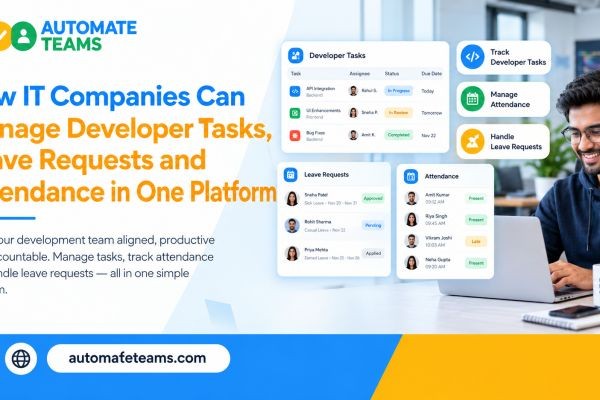
IT companies can manage developer tasks, leave requests and attendance in one platform by using employee management software for IT companies, such as the Automate Teams App. It links team chat, developer task tracking, leave approvals, IT attendance software and India payroll to a single employee record. Managers see who is working on what, who is on leave and what is overdue, without checking four different tools.
This article is written for IT founders, engineering managers and HR leads. It explains where time is lost in software teams and how one connected workspace fixes it. You will also learn how to set it up in stages and get answers to common questions.
The Daily Struggle Behind IT Team Management
If you lead an IT company, you know the pattern. A developer pings you about a blocker on chat, and a client change request arrives by email. Meanwhile, three people have asked for leave on different channels.
You become the glue between all of it. You check a spreadsheet to see who is off tomorrow, and you open another tool to see which tasks are late. At month end, HR rebuilds attendance by hand before payroll.
None of this is engineering work, yet it eats hours that should go to delivery. The problem is not your team’s effort. It is that people data and work data live in different places.
What Employee Management Software for IT Companies Should Do
Good employee management software for IT companies should cover the full loop of work and people. That means tasks, conversations, leave, attendance, payroll and training in one place. It should also work for developers on laptops and for staff on the move.
It should reduce follow-ups instead of adding more dashboards. Reminders should reach people where they already look. Managers should get a clear view of progress without asking for status updates.
Pricing matters too, because IT teams grow fast. A tool that charges per user gets costly with every new hire. Automate Teams includes unlimited workspace members on every plan, so adding people does not raise your per-seat bill.
Developer Task Tracking That Starts in the Conversation
Developer work often begins in a chat thread. Someone reports a bug, a product manager asks for a tweak, or a client needs a quick fix. If that request stays in chat, it gets lost.
With the Automate Teams App, you turn a message into a task in one step. Add an owner, a deadline, a priority and a checklist. Sub-tasks break larger work into clear pieces, and the conversation stays next to the task.
You can also describe a task in a prompt or voice note, and the Teams App Software drafts the task, deadline and priority. This saves engineering managers from typing the same details again and again. Developers see exactly what is expected and by when.
Keep Sprints and Routine Work on Schedule
Software teams have plenty of repeating work. Daily stand-up notes, weekly release checks, monthly client reports and routine approvals all come around again and again. Automate Teams handles these with recurring tasks and scheduled reminders.
Set the task once, choose how often it repeats and let the reminders run. Reminders go out on WhatsApp or email, so a developer is nudged even when they are not inside the app. Managers stop spending mornings asking who has done what.
Overdue items, tasks due today and work completed this week appear in clear views. Task activity summaries and reports help you spot delays early. You can then adjust priorities before a deadline is at risk.
Leave Requests Without the Email Chains
Leave management is a quiet time drain in IT companies. Requests come in through chat, email and verbal asks. Managers approve some, forget others and then wonder why a sprint is short-staffed.
In Automate Teams, employees apply for leave from their phone. The manager sees each request and approves or rejects it with one tap. Approved leave updates the attendance record automatically, so HR does not need to update a second sheet.
This also helps planning. When you see a developer is on leave next week, you can reassign tasks before they slip. Leave and work sit side by side in one workspace, which is what makes planning easier.
IT Attendance Software for Office, Hybrid and Field Teams
Attendance in IT is not always simple. Some staff work from the office, some are hybrid and some visit client sites. You need a system that reflects this without turning into paperwork.
Automate Teams offers face clock-in with a geo-fence, so office check-ins are verified against the right location. The dashboard shows who is present, late, on leave or absent, and you can view several branches in one place. If someone forgets to punch out, they can raise a regularization request for review.
Shifts, rosters and holidays are managed in the same workspace. This is useful for support teams that run in shifts, such as night or weekend coverage. It also gives HR clean attendance data before every payroll run.
From Attendance to Payroll Without Rework
Month-end payroll is where disconnected tools hurt most. HR teams often rebuild attendance records by hand and then cross-check leave balances. Errors lead to corrections and uncomfortable questions from staff.
Automate Teams connects these steps. Attendance, shifts, holidays and approved leave feed directly into payroll. EPF, ESI and TDS are calculated automatically, and pay slips are generated from the same workspace.
Before you lock the month, the system shows whether attendance has any mismatches. A clean sync means fewer corrections. For growing IT companies in India, this is a real saving of time every month.
Onboarding Developers With a Built-In LMS
Hiring is constant in IT, and onboarding takes managers away from delivery. Automate Teams includes a built-in learning module for training. You can assign courses such as security awareness, company policy or process induction inside the same workspace.
Managers see how many people have completed each course. New joiners finish training on mobile, so they can start learning on day one. This keeps onboarding moving without manual follow-ups.
Because training sits with tasks and attendance, it fits into normal work. You assign a course, track completion and follow up only where needed. One employee record connects it all.
How Each Role in Your IT Company Benefits
Different people get different value from one connected platform. Founders and operations heads review pending work, coordinate across departments and manage multiple branches. Engineering managers see task progress and leave at a glance.
HR and finance teams keep attendance, leave approvals, salary runs and pay slips linked. Developers check tasks, mark attendance, apply for leave and complete training on mobile. The Automate Teams App runs on web, Android and iOS.
Roles and permissions control who sees and manages what. This keeps sensitive data like payroll limited to the right people. Everyone else sees only what they need to do their job.
Plans and How to Get Started
Start small and expand as your team gets comfortable. Begin with tasks and team chat, then add leave, attendance and payroll. Team chat starts on the Growth plan, while leave, attendance and India payroll are part of the Scale and Enterprise plans.
What changes between plans is the number of active projects, shared storage and how much of the HR, payroll and learning suite is included. You can begin with a 7-day free trial or book a demo to see it with your own workflow. The Automate Teams pricing page helps you match a plan to your headcount.
Frequently Asked Questions
- What is the best employee management software for IT companies?
The right choice combines task tracking, team chat, leave, attendance and payroll. Automate Teams offers all of these in one workspace, with unlimited members on every plan. - Can I use Automate Teams for developer task tracking?
Yes. You can create tasks from conversations, add owners, deadlines, priorities, checklists and sub-tasks, and set recurring work with automatic reminders. - Does it work as IT attendance software?
Yes. It supports face clock-in with a geo-fence, shifts, rosters, holidays and regularization requests, and it shows daily attendance across branches. - Can attendance data be used for payroll?
Yes. Attendance, shifts, holidays and approved leave feed into payroll, and EPF, ESI and TDS are calculated automatically. - Do I pay per user?
No. Every plan includes unlimited workspace members. Plans differ in active projects, storage and the HR, payroll and learning features included. - Can developers use it on mobile?
Yes. It is available on web, Android and iOS, so staff can update tasks, mark attendance and apply for leave from anywhere.
Final Thoughts
IT leaders should spend their time on delivery, not on chasing updates and reconciling sheets. The Automate Teams App brings developer task tracking, leave requests, IT attendance software and payroll into one platform. Enter data once, and use it everywhere. Ready to simplify your IT team’s operations? Start the 7-day free trial or book a demo of Automate Teams.


