
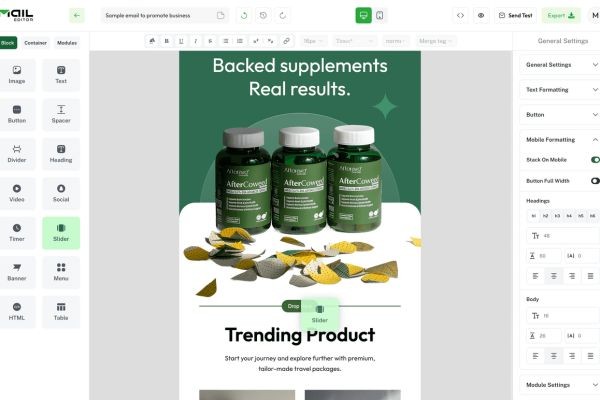
A business communication email template is a reusable framework designed for professional correspondence. It typically includes a subject line, greeting, opening statement, main message, call to action, closing, and signature. Think of it as a well-designed blueprint rather than a finished building. The blueprint gives you the structure, but you still customise the details depending on whether you're writing to a customer, colleague, manager, supplier, business partner, or potential collaborator.
The biggest advantage of using templates is consistency. Imagine a team where one employee writes extremely formal emails, another uses casual one-line messages, and a third sends long paragraphs without a clear request. Even when everyone is technically communicating, the lack of consistency can create friction. A good template helps establish a professional baseline while allowing the sender to adapt the tone. Current guidance from Microsoft recommends descriptive, action-oriented subject lines, keeping messages focused, putting action items or questions where they are easy to notice, and limiting recipients to people who actually need to read or act on the message.
Why Email Templates Matter in Business
Templates matter because business communication often involves repetition. You may introduce your company to several prospects, follow up with multiple clients, request information from different suppliers, or coordinate similar projects with different teams. Writing each email completely from scratch can consume valuable time, and rushing through repetitive communication can lead to errors. A template gives you a starting point that protects the basic quality of the message while allowing you to focus your attention on the information that actually changes.
There is another benefit that is easy to overlook: templates can improve clarity. When you already know that your message needs a clear purpose, relevant context, specific request, and next step, you're less likely to send an email that forces the recipient to guess what you mean. A recent HubSpot guide similarly recommends defining your goal, audience, and desired action before drafting, then keeping the message specific and easy to scan. The best template, therefore, isn't necessarily the longest or most formal one. It's the one that makes the recipient's job easier.
How to Structure a Professional Business Email
A professional email should feel easy to follow from the first line to the final sentence. Before writing, ask yourself one simple question: What should the recipient understand or do after reading this? If you can't answer that question, the email probably isn't ready. You might need to gather more information, separate multiple topics into different messages, or clarify the outcome you want.
A practical structure usually begins with a clear subject line and appropriate greeting. The opening should quickly explain why you're writing, while the body provides only the context the recipient actually needs. Your request or call to action should be unmistakable, and the closing should make the next step clear without sounding demanding. Grammarly's current professional-email guidance identifies a specific subject line, suitable greeting, focused message, clear call to action, and professional sign-off as core elements of an effective business email.
The Five Essential Parts of a Business Email
The first part is the subject line. A subject such as "Meeting" tells the reader almost nothing, while "Proposal Discussion – Tuesday Meeting Request" immediately provides context. The second part is the greeting, which should reflect your relationship with the recipient. "Dear Mr. Ahmed" may suit a formal first contact, while "Hi Sarah" may be perfectly appropriate for an established professional relationship. The third part is the purpose statement, where you explain why you're contacting the person without forcing them to search through a paragraph for the reason.
The fourth part is the main body and call to action. This is where you provide relevant information and clearly state what you need, whether that's approval, feedback, a meeting, a document, or a simple confirmation. The fifth part is the closing and signature, which should be professional but not unnecessarily elaborate. Your name, job title, company, and relevant contact details are usually enough. A simple structure works because it respects the recipient's time and reduces the mental effort required to understand your message.
Subject Line and Opening
The subject line acts like the label on a file folder. If the label is vague, the recipient has to open the folder just to discover what's inside. A strong business subject line should tell the reader the topic and, when appropriate, the action required. For example, "Collaboration Opportunity: Joint Webinar Proposal" is much more informative than "Partnership."
Your opening sentence should then reinforce the purpose. Instead of beginning with a long explanation about your company, get to the point. You might say, "I'm reaching out to explore a potential collaboration between our teams around..." This approach gives the recipient an immediate reason to continue reading. Microsoft specifically recommends descriptive and action-oriented subject lines and advises placing the most important information first.
Best Practices for Writing Business Communication Emails
The best email templates for business communication are flexible enough to handle different relationships and situations. They should help you write faster without encouraging you to send generic messages. Personalisation is essential, particularly when you're contacting someone for the first time. Mentioning a recent project, shared connection, relevant business need, or specific reason for reaching out can transform a template from a mass-produced message into a credible professional conversation.
Clarity should always come before cleverness. Don't make the recipient decode your meaning simply because you want the email to sound sophisticated. Use straightforward language, active voice, and specific requests. If you need a response by Friday, say so. If you want a 30-minute meeting, suggest a few times. If you're asking someone to review a document, identify the document and explain what kind of feedback you need.
It's also important to understand when email isn't the right channel. Microsoft recommends moving to a phone call or instant message when an immediate response is required, and suggests considering a meeting when an email conversation becomes lengthy without reaching resolution. Email is excellent for documenting information, making requests, and maintaining a written record, but it isn't always the best tool for resolving complicated or emotionally sensitive issues.
Email Templates for Business Communication
The following business communication email templates cover some of the most common situations you'll encounter. Treat them as starting points rather than rigid scripts. Replace every bracketed section with information specific to the recipient and situation, and remove anything that doesn't apply.
General Business Communication Email Template
This general template works when you need to communicate with a client, supplier, colleague, or business contact about a straightforward professional matter.
Subject: [Clear Topic or Request]
Dear [Name],
I hope you're doing well.
I'm writing regarding [specific topic or reason for contacting them]. I wanted to [briefly explain the purpose, update, request, or question].
[Add the key details the recipient needs to understand the situation. Keep the information relevant and organised.]
Could you please [specific action you want the recipient to take] by [date or timeframe, if applicable]?
Please let me know if you have any questions or need any additional information from me. I appreciate your time and look forward to hearing from you.
Best regards,
[Your Name]
[Job Title]
[Company Name]
[Contact Information]
This template is intentionally broad because it can be adapted to almost any professional context. The key is to avoid leaving it generic. A recipient should be able to read the first two sentences and immediately understand why you contacted them.
Professional Introduction Email Template
A strong introduction email should establish who you are, why you're contacting the recipient, and what you hope will happen next. You don't need to write your entire professional biography. The recipient isn't looking for your life story; they're looking for relevance.
Subject: Introduction – [Your Name] from [Company]
Hi [Name],
I hope you're having a great week.
My name is [Your Name], and I'm [your role] at [Company Name]. We [briefly describe what your company does or the relevant service you provide].
I'm reaching out because [specific reason for contacting the recipient]. I believe there may be an opportunity for us to [specific benefit, shared goal, or potential collaboration].
I'd be happy to arrange a brief conversation to learn more about your priorities and explore whether there is a good fit. Would you be available for a short call on [Option 1] or [Option 2]?
I look forward to connecting.
Best regards,
[Your Name]
The important word here is relevance. If you received dozens of introduction emails every day, would you respond to someone who clearly understood your business, or someone who sent the same paragraph to everyone? Personalisation doesn't mean writing a completely different email every time. It means changing the details that demonstrate you've thought about the recipient.
Business Follow-Up Email Template
Follow-up messages are often necessary, but they should add value rather than simply say, "Just following up." A useful follow-up reminds the recipient of the original context and makes the next action easy.
Subject: Following Up – [Original Topic]
Hi [Name],
I wanted to follow up on my previous email regarding [specific topic].
I understand you may be busy, so I wanted to check whether you've had a chance to review [proposal/document/request]. We're currently planning [relevant next step], so it would be helpful to know whether you'd like to move forward.
If you're interested, please let me know by [date]. If you'd prefer to discuss this first, I'm happy to arrange a short call at a convenient time.
Thanks again, and I look forward to hearing from you.
Best,
[Your Name]
A follow-up should never feel like you're chasing someone simply because you want a response. Give them a reason to respond. Mention a deadline, clarify the next step, answer a likely question, or provide new information. Current guidance from Grammarly recommends acknowledging messages when a full response isn't immediately possible and setting expectations about when a more complete answer will come.
Collaboration Email Templates
A collaboration email template is useful when you're proposing that two people, teams, companies, or organisations work together toward a shared objective. The strongest collaboration emails focus on mutual value. Instead of saying only, "I want to collaborate with you," explain why the collaboration makes sense and what each side could gain.
Collaboration can mean many things: a joint marketing campaign, content partnership, event, webinar, research project, product integration, supplier relationship, or cross-promotional opportunity. The template should therefore be flexible. You want to provide enough information to create interest without overwhelming the recipient with a complete business plan in the first email.
Email Template for Collaboration Request
Subject: Collaboration Opportunity – [Specific Project or Idea]
Hi [Name],
I hope you're doing well.
I've been following [Company/Brand/Project Name], and I really appreciate your work in [specific area]. I believe there could be a strong opportunity for our teams to collaborate on [specific idea or project].
Our idea is to [briefly explain the collaboration]. We believe this could help [describe the benefit to the recipient or shared audience] while also allowing us to [your benefit or shared objective].
If this sounds interesting, I'd love to discuss the idea in more detail and explore how we could structure the collaboration.
Would you be available for a brief call next week? I'm available on [Option 1] or [Option 2], but I'm happy to work around your schedule.
Best regards,
[Your Name]
[Position]
[Company]
The strongest part of this template is the explanation of why the collaboration makes sense. Don't assume the recipient will automatically understand the opportunity. Connect your idea to something they care about. Collaboration works when the value exchange is clear.
Partnership Proposal Email Template
A partnership proposal requires slightly more detail because you're presenting a potential business relationship rather than simply asking for an introduction.
Subject: Partnership Proposal – [Company Name] x [Partner Name]
Dear [Name],
I hope you're well.
I'm reaching out from [Company Name] to explore a potential partnership with [Recipient's Company]. Based on our work in [industry or area], I believe our organisations may have complementary strengths.
We would like to explore a partnership focused on [specific objective]. Our initial idea is to [brief description of proposed arrangement], which could potentially help us [shared benefit or outcome].
From our side, we can contribute [resource, expertise, audience, technology, distribution, or other value]. We believe your team could bring [specific complementary strength].
I'd welcome the opportunity to discuss this further and learn whether the idea aligns with your current priorities. Would you be open to a 20–30 minute conversation in the coming weeks?
Thank you for considering the opportunity.
Kind regards,
[Your Name]
[Title]
[Company]
[Contact Information]
The word partnership can sound significant, so be careful not to make the proposal feel heavier than it needs to be. Your first email should open a conversation, not force the recipient to make a major commitment immediately.
Team Collaboration Email Template
Internal collaboration emails have a different purpose. You're often trying to coordinate people who already know you, which means you can be more direct.
Subject: Team Collaboration – [Project Name / Task]
Hi Team,
I wanted to bring everyone together regarding [project or task].
Our main objective is to [specific goal]. To keep things moving, I'd like us to focus on the following priorities:
-
[Priority or task 1]
-
[Priority or task 2]
-
[Priority or task 3]
[Name], could you please handle [specific responsibility]?
[Name], could you review [specific item] and share your feedback by [date]?
I'll take responsibility for [your task] and will share an update by [date].
Please reply with any concerns, dependencies, or issues that could affect the timeline. If there are topics that require a deeper discussion, we can schedule a short meeting.
Thanks, everyone.
Best,
[Your Name]
This structure makes ownership visible. Instead of sending a vague message that says "Let's collaborate on this," it tells people what needs to happen and who is responsible. That small change can eliminate a surprising amount of confusion.
Project Collaboration Email Templates
Projects often fail at the communication level before they fail at the technical level. People assume someone else is responsible, deadlines aren't clearly communicated, or a small change isn't shared with the people affected. A good project collaboration email template helps create a written record of responsibilities and expectations.
The trick is to keep project emails structured without turning every message into a corporate novel. Use headings or short sections when necessary, identify decisions clearly, and separate action items from background information.
Project Kickoff Email Template
Subject: Project Kickoff – [Project Name] | Next Steps
Hi Everyone,
Thank you for joining the [Project Name] project.
The goal of this project is to [describe the main objective]. We are targeting completion by [date], with the key milestones outlined below:
-
[Milestone 1] – [Date]
-
[Milestone 2] – [Date]
-
[Milestone 3] – [Date]
The primary responsibilities are as follows:
-
[Name/Team] – [Responsibility]
-
[Name/Team] – [Responsibility]
-
[Name/Team] – [Responsibility]
Our immediate next step is to [specific action]. Please review the information above and let me know if you identify any issues, dependencies, or timeline concerns.
I'm looking forward to working with everyone and making this project a success.
Best regards,
[Your Name]
A kickoff email should answer three questions: Why are we doing this? Who is doing what? What happens next? If those answers are clear, you've already removed much of the uncertainty that slows projects down.
Project Update Email Template
Subject: Project Update – [Project Name] – [Date]
Hi Team,
Here's the latest update on [Project Name].
Current Status: [On Track / At Risk / Delayed]
Since our last update, we have completed:
-
[Completed task]
-
[Completed task]
We are currently working on:
-
[Current task]
-
[Current task]
The main issue or risk at this stage is [brief explanation]. To address this, we are [action being taken].
Our next milestone is [milestone] by [date].
Action Required: [Name/Team] needs to [specific action] by [deadline].
Please let me know if you have any questions or if there are new issues that should be added to the next update.
Best,
[Your Name]
The benefit of this format is that someone can scan it quickly and understand the project's condition. Microsoft recommends organising email from most important to least important and making action items or questions stand out.
How to Personalize an Email Template
Using a template doesn't mean sending the same email to everyone. The template should handle the structure while you handle the relationship. Before sending, replace generic language with specific information about the recipient, their organisation, and the reason you're contacting them.
For example, compare these two openings:
"I am writing to explore a possible collaboration between our companies."
And:
"I noticed that your team recently launched a new sustainability initiative, and I believe our data platform could support the reporting side of that programme."
The second version immediately feels more relevant because it demonstrates context. You don't need to flatter the recipient excessively or pretend you've been following their company for years. One genuine, specific observation is often more persuasive than a paragraph of generic praise.
Personalisation can also mean adjusting the level of formality. A first-time message to a senior executive may require a more formal tone than an internal note to a teammate. Grammarly's current guidance similarly recommends matching the tone to the relationship and using a more formal approach for new, senior, or external recipients.
Common Business Email Mistakes to Avoid
One of the most common mistakes is burying the main point. If you need approval, ask for approval. If you want a meeting, request a meeting. If you need a document, say which document. Don't make the recipient read six paragraphs before discovering what you actually want.
Another mistake is sending messages to too many people. More recipients don't necessarily mean better communication. Microsoft recommends placing people who need to take action in the To field and people who only need to be informed in Cc, while limiting recipients to those who genuinely need the information.
You should also avoid vague subject lines, excessive jargon, unnecessary attachments, emotional replies, and unexplained deadlines. Microsoft advises against sending angry messages, using ALL CAPS, and relying on high-importance markers too frequently. It also recommends links instead of attachments in many situations and suggests moving complex, unresolved conversations to a meeting when email is no longer efficient.
Perhaps the most damaging mistake is failing to edit a template before sending it. Accidentally leaving the wrong company name, recipient name, date, or project reference in an email instantly destroys credibility. Before clicking send, check the recipient, subject, attachments or links, names, dates, requested action, and tone. A 30-second review can prevent an embarrassing mistake that takes much longer to repair.
Conclusion
A strong business communication email template isn't about replacing human communication with automation. It's about giving your communication a reliable structure. When you use a template thoughtfully, you spend less time staring at a blank screen and more time focusing on the information that actually matters to the recipient. Whether you're writing a simple business update, introducing yourself, following up with a client, coordinating a project, or proposing a new partnership, the same principles apply: be clear, be relevant, respect the reader's time, and make the next step obvious.
The best email templates for business communication are also adaptable. A general template can become a client email with a few changes. A collaboration email can become a partnership proposal by adding mutual benefits and responsibilities. A project update can become a team communication tool by highlighting progress, risks, owners, and deadlines. The template is simply the skeleton; the personal context is what gives the message life.
When it comes to a collaboration email template, always remember that you're not just asking someone to work with you. You're presenting a reason for them to care about the conversation. Explain what you bring to the table, identify the shared opportunity, and make the next step easy. Do that consistently, and your emails will become more than messages sitting in crowded inboxes—they'll become practical tools for building relationships, moving projects forward, and creating meaningful business opportunities.
FAQs
-
What is the best format for a business communication email?
The best format usually includes a clear subject line, professional greeting, concise purpose statement, relevant supporting information, specific call to action, and professional closing. The exact tone should depend on your relationship with the recipient and the purpose of the email. A first-time business contact generally benefits from a more formal tone, while communication with a familiar colleague can be more conversational.
-
How do I write a good collaboration email?
Start by explaining why you're contacting the person and why you believe the collaboration makes sense. Identify the specific opportunity, describe the potential mutual benefit, and briefly explain what you can contribute. Finish with a simple call to action, such as asking whether they're available for a short meeting. Avoid making the first email excessively long or asking for a major commitment immediately.
-
Can I use the same email template for every business contact?
You can use the same basic structure, but you shouldn't send exactly the same message to everyone. Personalise the recipient's name, company, situation, reason for contact, and desired outcome. A reusable template should save you time while still making the recipient feel that the message was written specifically for them.
-
How long should a professional business email be?
There is no universal word count, because complexity varies by situation. However, your email should contain only the information necessary for the recipient to understand the issue and take the requested action. If the topic becomes complicated, consider using a short email to provide context and then moving the detailed discussion to a meeting or another collaboration channel.
-
What should I include in an email template for collaboration?
A strong email template for collaboration should include a specific subject line, personalised introduction, reason for reaching out, description of the collaboration idea, potential mutual benefits, and clear next step. If appropriate, briefly mention what you can contribute and why you believe the recipient is a good fit. The goal of the first email is usually to start a conversation, not explain every detail of the entire partnership.
Contacts:
Email: support@maileditor.net
Phone: +15057558453
Address: 1209 MOUNTAIN ROAD PL NE STE R,
ALBUQUERQUE, NM 87110






