
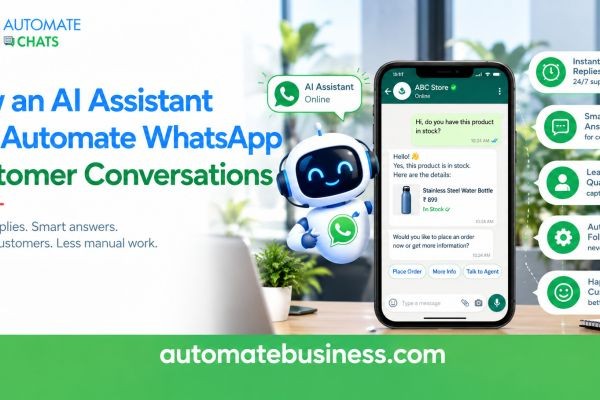
An AI assistant automates WhatsApp customer conversations by answering routine questions from your business information and passing complex chats to your team. Automate Chats WhatsApp API Marketing brings this AI assistant together with a shared team inbox, broadcast campaigns, chatbots, and analytics in one workspace. The result is faster replies without losing the human touch.
This guide explains how an AI WhatsApp agent works and where it fits alongside chatbots and automation. It also covers real use cases, what makes Automate Chats different, and answers to common questions.
What Is an AI Assistant for WhatsApp Customer Conversations?
An AI assistant is software that reads a customer's message and replies in natural language. It does not follow a rigid menu. It uses the information you give it to answer the question that was actually asked.
Most businesses know the problem. Customers message at night, on weekends, and during busy hours. Teams cannot answer every "What is your return policy?" or "Is delivery available in my city?" in real time.
An AI assistant takes these repeat questions off your team's plate. Your agents then spend their time on sales conversations, complaints, and special requests. Customers get a quick answer, and your team gets room to do higher-value work.
This matters even more on WhatsApp, where people expect a reply within minutes. A slow response often means a lost sale. Automation on the WhatsApp Business API closes that gap.
How an AI WhatsApp Agent Answers Using Your Business Information
The AI assistants in Automate Chats answer using the information you provide. You add sources such as your product catalogue and delivery policy. The assistant then draws on those sources instead of guessing.
This is important for accuracy. Imagine a customer asks whether a sale item can be returned. The assistant can reply that sale items may be returned within 7 days if unused and in their original packaging, based on the policy you supplied.
The product dashboard also shows a live answer preview with a confidence score. That lets you check how the assistant responds before customers see it. You can keep improving the answers by updating your sources.
Because the AI works from your own content, replies stay consistent with your brand. Every agent and every shift gives the same information. That consistency builds customer trust over time.
Human Handover: Keeping Your Team in Control
Good automation knows its limits. Automate Chats lets the AI assistant hand the conversation to your team when a case needs a person. For example, you can set a rule to hand over when a refund exceeds a certain amount, such as ₹5,000.
The handover keeps the full conversation history in the shared inbox. Your agent sees what the customer asked and what the AI replied. Nobody has to ask the customer to repeat themselves.
The inbox also supports AI-drafted replies. Inside a chat, a draft appears, and your agent reviews it and presses Tab to insert it. A person stays in charge of the final message.
This balance is the real value of AI in customer service. Customers get speed on simple questions and a real human on sensitive ones. Your team keeps control without carrying the entire workload.
Where AI Fits with Chatbots, Automation, and the Shared Inbox
AI works best as part of a larger WhatsApp workflow. Automate Chats combines several tools, and each has a different job.
- No-code WhatsApp chatbots guide customers step by step. They ask a question, save the answer, and route the customer by response.
- WhatsApp automation handles scheduled follow-ups, reminders, and after-hours replies.
- AI assistants answer open-ended questions using your business information.
- The WhatsApp team inbox keeps every conversation assigned, noted, and visible to your team.
Think of chatbots as the structure and AI as the flexible expert. A chatbot can qualify a new enquiry by asking which service the customer wants. The AI can then answer follow-up questions about pricing or timelines before the chat reaches sales.
Because everything lives in one workspace, you do not switch between separate tools. Contacts, tags, and groups carry across conversations, campaigns, and automation. You build the customer picture once and use it everywhere.
Real Use Cases for WhatsApp Customer Support Automation
Automate Chats lists practical use cases for MSMEs. Each one benefits from AI and automation working together.
- Customer support: answer common questions instantly and route complex chats to the right team member.
- Sales follow-ups: send WhatsApp messages when a lead moves to a new stage, so no follow-up is missed.
- Lead qualification: ask qualifying questions, capture details, and send hot leads to sales.
- Order updates: share confirmations, shipping status, and delivery changes through templates.
- Appointment reminders: reduce no-shows with automated reminders.
- Marketing broadcasts: send campaigns to segmented audiences and track delivery, reads, and replies.
Industry workflows exist for e-commerce, education, real estate, and healthcare. An e-commerce brand can handle product questions and orders. A clinic can manage appointments and routine help.
Automate Business also runs its own WhatsApp assistant on its website. The bot replies instantly, and the team joins when needed. It shows the same model in action.
How Automate Chats Is Different
Many WhatsApp tools focus on one job, such as sending messages in bulk. Automate Chats is built so that marketing, sales, and support share one workspace. You do not need to stitch together an inbox, a chatbot builder, and a reporting tool.
The AI is also grounded in your information and designed to hand over. It does not try to replace your team. It answers what it can and escalates the rest, with the context intact.
Analytics cover the whole picture, including chatbot and AI activity. You can track conversation volume, first reply time, resolution rate, and team load. Sample dashboards on the platform show a first reply time of 1 minute 42 seconds and a 91.4% resolution rate, which are illustrative figures, not guarantees.
Finally, Automate Chats connects to the rest of your business. APIs and webhooks link WhatsApp to your systems, and it works with Automate CRM. A WhatsApp enquiry can become a CRM lead without manual entry.
It is part of Automate Business, which serves over 3,000 businesses across 35+ industries. The platform is built for MSMEs and offers role-based access and audit logs. Automate Business is also a Meta Business Partner.
How to Start Automating WhatsApp Conversations
You do not need a big rollout. Begin with the questions your team answers most often and add them as sources. Test the assistant's answers in the preview, then switch it on for real conversations.
Set clear handover rules from day one. Decide which topics, such as refunds, complaints, or custom quotes, always go to a person. Review your analytics weekly and refine.
You can start with a 7-day free trial or book a demo to see the workflow with your own use case. The onboarding team can help you import contacts through CSV, so you are running in days.
FAQs
- Can an AI assistant really handle WhatsApp customer conversations?
Yes, for routine questions. It answers using your business information and hands complex chats to your team. - Will the AI give wrong answers?
It answers from the sources you provide, and you can preview answers before going live. Handover rules add another layer of safety. - Do I need to know coding to set it up?
No. Chatbots are built with a no-code builder, and the AI uses information you add. - Can the AI work with my CRM?
Yes. Automate Chats works with Automate CRM, and APIs and webhooks connect it to other systems. - Is there a free trial?
Yes. Automate Chats offers a 7-day free trial and a live demo.
Final Thoughts
An AI assistant gives your customers fast, accurate replies on WhatsApp while your team focuses on work that needs a human. Automate Chats combines AI, chatbots, automation, a shared inbox, and analytics in one place. Start your 7-day free trial or book a demo to see it in action.






