
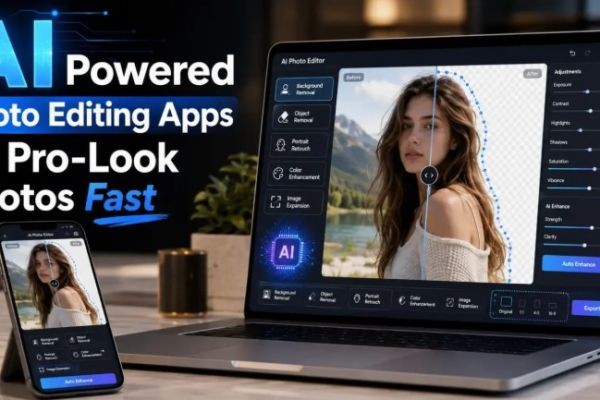
A great photo can make a product look more trustworthy, a social media post more engaging, and a profile picture more polished. But not everyone has the time, budget, or technical skill to use advanced editing software.
That is where AI photo editing is changing the game.
Instead of spending hours learning layers, masks, lighting correction, and manual cutout tools, everyday users can now improve images in minutes. AI tools can brighten dull photos, remove unwanted objects, clean up backgrounds, retouch portraits, sharpen details, and create more professional-looking visuals with only a few taps.
For anyone comparing the best AI powered photo editing apps, the real question is not just which app has the most features. The better question is: which app solves your exact photo problem quickly and naturally?
Why Professional-Looking Photos Matter
Photos are often the first thing people notice online. Before someone reads a caption, clicks a product page, opens a blog post, or checks a profile, they usually judge the image first.
Clean, sharp, well-edited photos can help with:
- Building trust on websites and online stores
- Making social media posts look more polished
- Improving profile photos and personal branding
- Creating better thumbnails, banners, and ads
- Making products look clearer and more appealing
- Turning casual phone photos into usable content
The good news is that professional-looking photos no longer require professional-level editing skills. AI photo editing tools make many complex tasks easier for beginners.
What AI Photo Editing Can Do
AI photo editing uses smart tools to understand what is inside an image. It can detect people, objects, faces, backgrounds, lighting, edges, colors, and image quality. This helps the software make faster and more accurate edits than a beginner could usually do by hand.
Here are some of the most useful AI editing features.
1. Background Removal
Background removal is one of the most popular AI photo editing features. It lets users cut out a person, product, or object from the background automatically.
This is useful for:
- Product photos
- Profile pictures
- Social media graphics
- YouTube thumbnails
- Posters and flyers
- Online store images
- Resume or portfolio photos
Before AI tools became common, background removal required careful manual selection. Now, many apps can detect the main subject and remove the background in seconds.
For small business owners, this is especially helpful. A simple product photo taken on a table can be turned into a cleaner, more professional-looking image with a plain or branded background.
2. Object Removal
Sometimes a photo is almost perfect, but one distracting object ruins it. It could be a person in the background, a wire, a trash bin, a sign, a stain, or random clutter.
AI object removal helps erase those distractions and fill in the missing area naturally.
This is useful for:
- Travel photos
- Real estate photos
- Product shots
- Lifestyle images
- Event photos
- Social media content
The goal is not to create a fake-looking image. The goal is to remove small distractions so the main subject looks cleaner and more focused.
3. Photo Enhancement
Many phone photos look dull because of poor lighting, soft focus, low contrast, or weak colors. AI enhancement tools can automatically improve the overall quality of an image.
They may help adjust:
- Brightness
- Contrast
- Sharpness
- Color balance
- Clarity
- Noise
- Blur
- Detail
This is useful for beginners because they do not need to understand every manual setting. A one-tap enhancement can often make a photo look cleaner and more balanced.
For bloggers, sellers, and content creators, this saves time. Instead of editing every detail manually, they can quickly improve a batch of images before publishing.
4. Portrait Retouching
Portrait retouching is helpful for selfies, profile photos, team photos, author images, and personal branding.
AI portrait tools can improve:
- Skin tone
- Shadows
- Blemishes
- Face brightness
- Eye clarity
- Overall lighting
The best portrait edits look natural. Over-editing can make a face look unrealistic, so it is better to use light adjustments that keep the person looking like themselves.
For LinkedIn profiles, website bios, creator pages, and business headshots, subtle AI retouching can make a big difference.
5. Image Expansion and Reframing
Sometimes a photo is good, but the framing is too tight. Maybe the subject is too close to the edge, or the image does not fit the size needed for a banner, thumbnail, or social post.
AI image expansion can extend the edges of a photo and create extra background around the subject. This makes it easier to resize images for different platforms.
For example, one image may need to work as:
- A square Instagram post
- A wide blog banner
- A vertical story
- A website hero image
- A YouTube thumbnail
AI expansion helps creators reuse the same image in different formats without starting from scratch.
Who Benefits Most from AI Photo Editing?
AI photo editing is useful for far more than photographers. It can help anyone who needs better visuals but does not want to spend hours editing.
Small Business Owners
Small businesses often need product photos, promotional graphics, website images, and social media visuals. AI editing helps them create cleaner content without hiring a designer for every small task.
Online Sellers
Online shoppers depend heavily on product images. A clear product photo with a clean background can make an item look more trustworthy and easier to understand.
AI tools can help sellers remove clutter, improve brightness, and create more consistent product visuals.
Content Creators
Creators need a steady flow of thumbnails, posts, profile images, banners, and short-form content visuals. AI editing speeds up the process and helps keep content looking polished.
Students and Freelancers
Students and freelancers can use AI photo editing for presentations, portfolios, resumes, personal branding, and project visuals.
Everyday Smartphone Users
Even casual users benefit from AI editing. Family photos, travel shots, selfies, and event pictures can all look better with small improvements.
How to Choose the Right AI Photo Editing App
The best AI photo editing app depends on your goal. A simple app may be perfect for quick fixes, while a more advanced editor may be better for detailed creative work.
Here is a simple way to decide.
Choose a Simple App for Everyday Fixes
If you mostly want to brighten photos, remove small distractions, or improve casual pictures, choose an easy mobile-friendly app.
Look for:
- One-tap enhancement
- Simple object removal
- Basic background tools
- Easy export options
- A clean interface
Choose a Design App for Social Media
If you want to create posts, stories, banners, thumbnails, or ads, choose an app that combines photo editing with templates.
Look for:
- Social media templates
- Text tools
- Background removal
- Brand colors
- Resize options
- Drag-and-drop editing
Choose an Advanced Editor for Professional Control
If you need detailed image editing, complex background changes, or advanced creative control, choose a more powerful editor.
Look for:
- Layer support
- Generative editing
- Detailed selection tools
- High-resolution exports
- Manual adjustment controls
Choose an Online Tool for Quick Browser Editing
If you do not want to install software, browser-based AI editors can be useful. They are convenient for quick edits on laptops, desktops, tablets, or shared devices.
Look for:
- Web-based access
- Fast upload and export
- Background removal
- Enhancement tools
- Simple cleanup features
Tips for Making AI-Edited Photos Look Natural
AI tools are powerful, but the best results still depend on good judgment. A photo should look improved, not artificial.
Use these simple tips:
Start With the Best Original Photo
AI can improve a weak image, but it works better when the original photo is clear. Try to start with good lighting, a steady shot, and a clean subject.
Avoid Over-Retouching
Too much smoothing, sharpening, or color correction can make a photo look fake. Use subtle edits for a more professional result.
Keep Backgrounds Clean
A simple background usually looks better than a busy one. For product photos, profile photos, and business images, clean backgrounds help the subject stand out.
Match the Edit to the Platform
A LinkedIn profile photo should look natural and polished. A social media graphic can be more colorful and creative. A product photo should be clear and accurate.
Check the Final Image Before Publishing
Always zoom in and review the final image. Look for strange edges, distorted objects, unnatural skin, or background errors.
Common AI Photo Editing Mistakes to Avoid
AI editing can save time, but beginners sometimes make mistakes that reduce image quality.
Avoid these common problems:
- Using too many filters
- Making skin look too smooth
- Choosing unrealistic backgrounds
- Over-sharpening images
- Ignoring image size requirements
- Exporting low-resolution files
- Leaving AI mistakes uncorrected
The best AI-edited photos should look clean, natural, and useful.
Final Thoughts
AI photo editing has made professional-looking photos much easier to create. Whether you are a small business owner, online seller, creator, student, freelancer, or casual smartphone user, AI tools can help you improve images faster.
The key is choosing the right app for the job. Some tools are better for quick phone edits, while others are better for background removal, social media design, product photos, portrait retouching, or advanced creative control.
You do not need to become a professional designer to make better photos. With the right AI photo editing app and a few smart editing habits, you can turn ordinary images into cleaner, sharper, more polished visuals.
FAQ
What is AI photo editing?
AI photo editing uses smart tools to improve or change images automatically. It can help remove backgrounds, erase objects, enhance lighting, retouch portraits, and improve image quality.
Can beginners use AI photo editing apps?
Yes. Many AI photo editing apps are designed for beginners and do not require advanced editing knowledge.
Are AI-edited photos good for business use?
Yes, as long as the edits look natural and accurate. AI editing can help create cleaner product photos, profile images, website visuals, and social media graphics.
What is the best AI photo editing feature for product photos?
Background removal and photo enhancement are two of the most useful features for product photos because they help the item look clearer and more professional.
Should AI photo edits look dramatic?
Not always. For professional use, subtle edits usually work best. The goal is to make the photo look cleaner, not fake.
Optional Author Bio:
This guest post was contributed by a technology writer who covers smartphone apps, AI tools, digital productivity, and beginner-friendly software guides. For more practical app recommendations, explore this guide to AI photo editing apps: https://technexahub.com/smartphones/apps/ai-powered-photo-editing-apps-for-pro-look/






