
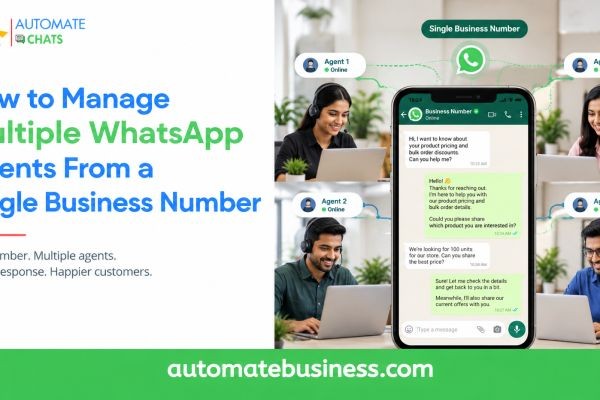
You can manage multiple WhatsApp agents from a single business number by connecting that number to a shared team inbox through the WhatsApp Business API. Each agent works from their own login, picks up assigned chats, and replies from the number your customers already trust.
Automate Chats WhatsApp API Marketing software brings the shared inbox, broadcast campaigns, automation, chatbots, and AI assistants into one workspace. This guide explains why the regular app falls short and how a shared inbox works. It then covers a step-by-step setup, automation, performance tracking, and what sets Automate Chats apart.
Why One Business Number Needs Multiple Agents
Customers expect fast replies on WhatsApp. A single phone cannot keep up once sales, support, and follow-ups all land on one number.
Most growing businesses end up passing a phone around or sharing a login. Messages get missed. Two people reply to the same customer, and nobody knows who owns which chat.
The fix is not a second number for every person. Customers want one number they can save and trust. Your team needs a system that lets many people work behind it.
That is what a WhatsApp shared team inbox does. Everyone sees the same conversations, and each conversation has one clear owner.
How a WhatsApp Shared Team Inbox Works
A shared team inbox sits on top of the WhatsApp Business API. Your business number connects once, and your whole team works from the same dashboard. In Automate Chats, all your sales and support chats come into one inbox. Each conversation can be assigned to a team member, and the full customer history stays attached to the chat. Agents can add internal notes that customers never see. The next agent who opens the chat knows what was promised and what is pending.
The inbox also shows how many chats are waiting and how many are still unassigned. A manager can see the queue at a glance and step in before a customer waits too long. Because the history stays with the contact, a handover never means asking the customer to repeat themselves. That one change often improves customer experience more than any other.
Step-by-Step: Set Up Multiple Agents on One Number
Here is a simple setup you can follow with Automate Chats.
- Start a free trial. Sign up for the 7-day free trial at Automate Chats. You can also book a demo if you want a guided walkthrough.
- Connect your WhatsApp Business API number. Link the single business number your customers already know.
- Add your agents. Invite your sales, support, and operations team so each person has their own access.
- Import your contacts. Upload customer details, then add tags and groups so agents see who they are talking to.
- Assign chats. Hand each conversation to the right person, or use routing so new enquiries reach the right team.
- Set up templates. Prepare approved WhatsApp message templates for common messages like order updates and reminders.
- Turn on automation. Add after-hours replies and follow-up sequences so no message goes unanswered.
Once this is running, your team replies faster and works without stepping on each other.
Assign and Route Chats So Nothing Gets Missed
Assignment is the heart of multi-agent WhatsApp. Without it, a shared inbox is just a crowded one.
Give every chat one owner. That owner is responsible for the next reply, and everyone else can see who it is.
Route chats by purpose. Pricing questions go to sales, delivery issues go to support, and complex requests go to a senior agent. You can also use round-robin assignment so new leads are shared evenly and reach someone in minutes.
Use internal notes for handovers. A short note such as “refund approved, waiting for the courier” saves the next agent a lot of time.
Use Automation, Chatbots, and AI to Support Your Agents
Agents should spend their time on conversations that need a human. Automation can take care of the rest. WhatsApp automation handles scheduled follow-ups, reminders, and after-hours replies. For example, a new website lead can get a welcome message at once, a product guide after a day, and a check-in after three days. No-code WhatsApp chatbots guide customers through a step-by-step flow. They can ask which service the customer wants, save the answer, route by response, and assign the chat to sales. You build all of this without writing code.
AI assistants answer common questions using the business information you provide, such as your product catalogue and delivery policy. When a question is complex, the assistant hands the conversation over to your team. You can set rules, for example a handover when a refund is above a set amount. Together these tools keep response times low while your agents focus on high-value chats.
Run Broadcast Campaigns From the Same Number
Many teams use one tool for support and another for marketing. That splits your customer data and your replies.
With Automate Chats, WhatsApp broadcast campaigns run from the same workspace. You choose the audience, personalize approved templates, and send.
Replies come back to the shared inbox. Your agents can continue the conversation right away without switching tools. The sample campaign on the Automate Chats dashboard shows 2,480 contacts with a 97.5% delivery rate, a 79.9% read rate, and an 11.8% reply rate. Those are demo figures, but they show what you can track for every send.
Track Agent Performance With Analytics
You cannot improve what you cannot see. Analytics shows how your team is doing across chats and campaigns.
Automate Chats reports conversation volume, first reply time, resolution rate, and team load. The sample dashboard shows a first reply time of 1 minute 42 seconds and a 91.4% resolution rate. It also shows how busy each agent is, so you can balance the workload.
You also see campaign results and chatbot and AI activity. You no longer need to rebuild reports in spreadsheets.
Use these numbers in weekly reviews. If one agent is overloaded, rebalance chats. If first reply time rises in the evening, add an after-hours automation.
How Automate Chats Is Different
Many tools handle one part of WhatsApp well and leave you to stitch the rest together. Automate Chats takes a different approach. Everything in one workspace. The shared inbox, campaigns, automation, no-code chatbots, AI assistants, contacts, analytics, and APIs sit together. You do not pay for or manage a separate tool for each job.
Built for MSMEs. Automate Chats is made in India for growing businesses, with a focus on simple setup and a short learning curve. Small teams with no IT staff can get started without help. AI that knows your business. Assistants answer from the information you give them, and they hand over to your team when needed. Your agents stay in control.
Part of a wider business suite. Automate Chats connects with Automate CRM, tasks, and forms. Sales follow-ups, order updates, and appointment reminders can all flow through WhatsApp. Open connections. APIs and webhooks let you connect WhatsApp to your other systems, so customer requests move to the right next step.
Trusted and supported. Automate Business is a Meta Business Partner used by more than 3,000 businesses across 35+ industries. An onboarding team helps you move your existing data. Easy to try. You get a 7-day free trial and a free demo, so you can test with your own team first.
Best Practices for Multi-Agent WhatsApp
A few habits keep your shared inbox healthy.
- Set a reply-time goal and share it with your team.
- Keep agents in clear roles, such as sales, support, and operations.
- Use approved templates for repeat messages.
- Review unassigned chats several times a day.
- Check analytics every week and adjust.
Small routines like these protect the customer experience as your volume grows.
Frequently Asked Questions
- Can multiple agents use one WhatsApp number?
Yes. With the WhatsApp Business API and a shared team inbox, many agents can reply from one number at the same time. - Do I need a different number for each agent?
No. Your customers see only your single business number. Agents work behind it with their own logins. - How do I stop two agents replying to the same customer?
Assign every conversation to one owner. The inbox shows who owns each chat, so duplicate replies stop. - Can I use chatbots and AI with a shared inbox?
Yes. Chatbots and AI assistants handle common questions, then pass complex chats to a human agent. - Can I run marketing campaigns from the same number?
Yes. Broadcast campaigns use your approved templates, and the replies land in the same shared inbox. - Is there a free trial?
Yes. Automate Chats offers a 7-day free trial, and you can also book a demo.
Conclusion
Managing multiple WhatsApp agents from a single business number is simple with the right setup. A shared inbox gives your team one view, assignment gives every chat an owner, and automation and AI remove repetitive work. Automate Chats puts all of this, plus campaigns and analytics, in one workspace. Start your 7-day free trial or book a demo to see it with your own team.






