Introduction
PDF documents are widely used for sharing information because they preserve formatting across devices and operating systems. However, many people end up with several PDF files that belong together. For example, a student may have multiple chapters of study material, while a business professional may have separate reports, invoices, and supporting documents.
Managing multiple files can become inconvenient, especially when documents need to be shared, stored, or printed together. This is why many users choose to merge PDF online rather than handling several files individually.
This guide explains why PDF merging is useful, how the process works, and how users can merge PDFs with VelaPDF to keep documents organized and easier to manage.
What Does It Mean to Merge PDF Files?
PDF merging is the process of combining two or more PDF documents into a single file.
Instead of sending, storing, or managing several separate documents, users can create one complete PDF that contains all the necessary pages in the desired order.
For example, you may combine:
- Project reports
- Contracts and attachments
- Study notes
- Invoices
- Business presentations
- Research materials
A merged file is often easier to organize and share than multiple separate documents.
Why People Merge PDF Files
There are many situations where combining documents is useful.
Better Organization
Keeping related documents together helps reduce confusion.
Instead of searching through multiple files, users can access everything from a single document.
Easier File Sharing
Sending one PDF is usually more convenient than sending several attachments.
This can make communication simpler for both the sender and the recipient.
Improved Document Management
Large projects often involve multiple files. Merging them creates a more organized structure and makes future reference easier.
More Convenient Printing
Printing a single combined document is generally easier than opening and printing multiple files individually.
Common Situations Where PDF Merging Helps
Different users rely on PDF merging for different reasons.
Students
Students often download notes, assignments, lecture materials, and research documents from various sources.
Combining related files can create a complete study resource for a course or project.
Teachers and Educators
Teachers frequently work with lesson plans, worksheets, and supplementary materials.
Merging documents allows them to distribute course content in a single file.
Business Professionals
Companies often prepare reports that include multiple supporting documents.
Combining these files makes information easier to review and share with clients or team members.
Freelancers
Freelancers may need to submit proposals, contracts, and project samples together.
A merged PDF helps present information in a clear and organized format.
Benefits of Using an Online PDF Merge Tool
Many people choose browser-based tools instead of desktop software when combining files.
No Software Installation
Online tools work directly through a web browser.
Users can combine documents without downloading programs or performing installations.
Access from Different Devices
Because browser-based tools work online, users can access them from:
- Desktop computers
- Laptops
- Tablets
- Smartphones
This flexibility is useful for people who work from multiple locations.
Faster Workflow
Instead of opening complex software, users can upload files, arrange pages, and combine documents in just a few steps.
Reduced Device Requirements
Online tools do not require significant storage space because no software is installed locally.
How to Merge PDFs with VelaPDF
The VelaPDF merge tool is designed to help users combine documents quickly through a web browser.
The process generally follows a few simple steps.
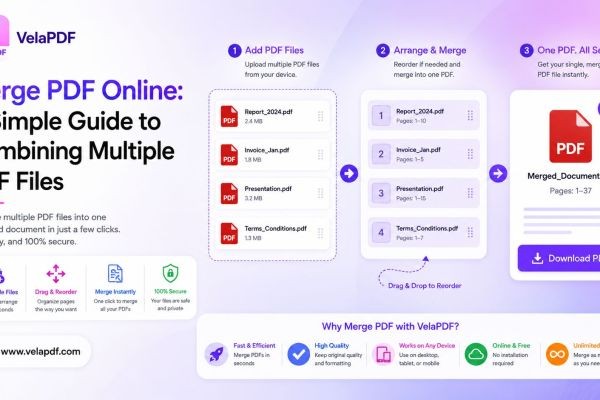
Step 1: Upload the PDF Files
Begin by selecting the documents you want to combine.
These may include reports, forms, invoices, presentations, contracts, or study materials.
Step 2: Arrange the Files
Most merging tools allow users to choose the order in which documents will appear.
This step is important because the final PDF will follow the selected sequence.
Step 3: Start the Merge Process
Once the files are arranged correctly, the system combines them into a single PDF document.
Step 4: Download the Combined File
After processing is complete, users can download the merged document and use it immediately.
The final PDF can be shared, stored, or printed as needed.
Tips for Better PDF Merging Results
Combining documents is straightforward, but a few simple practices can improve the final result.
Check Page Order Carefully
Before merging, review the order of files to ensure pages appear correctly in the final document.
Use Clear File Names
Descriptive file names help identify documents before combining them.
This reduces the chance of placing files in the wrong sequence.
Remove Unnecessary Pages
Review documents before merging and remove pages that are no longer needed.
This helps keep the final PDF focused and organized.
Keep Original Copies
Maintaining original files provides a backup if changes are needed later.
When Should You Merge PDFs?
Merging PDFs is particularly useful when:
- Multiple files belong to the same project
- Documents need to be shared together
- Users want better organization
- Printing several files at once is necessary
- Reports contain supporting documents
- Educational materials need to be grouped together
If documents are related and frequently used together, combining them often makes management easier.
Additional PDF Tools That Work Well with Merging
PDF merging is often only one part of document management.
Many users also rely on other PDF tools.
PDF Compression
After combining files, the final document may become larger in size.
Compression tools can reduce file size for easier sharing and storage.
PDF Splitting
Sometimes users need to extract specific pages from a large document.
Splitting tools help separate content into smaller files.
PDF Editing
Editing tools allow users to update information after merging documents.
PDF Conversion
Converting PDFs into formats such as Word can be useful when substantial editing is required.
Using these tools together helps create a more complete document workflow.
Conclusion
Managing multiple PDF files can become difficult when documents belong together but remain stored separately. Combining related files into one document makes organization, sharing, and printing more convenient.
The VelaPDF merge tool provides a browser-based way to combine documents without installing software. Whether you're working with study materials, business reports, contracts, presentations, or personal files, merging documents can help keep information organized and accessible.
If you're looking for a simple way to merge PDF online, VelaPDF offers an easy method for combining files and creating well-organized PDF documents for everyday use.






