
Introduction
If you’ve ever printed multiple copies of a document, you’ve probably seen the “Collate” option in your printer settings. But why is collate important for printing?
Collating keeps pages in the correct order when printing multiple copies. It saves time, prevents mistakes, and makes document organization easier especially for offices, schools, and businesses.
In this guide, you’ll learn exactly why collate is important for printing, how it works, and when you should use it.
What Does Collate Mean in Printing?
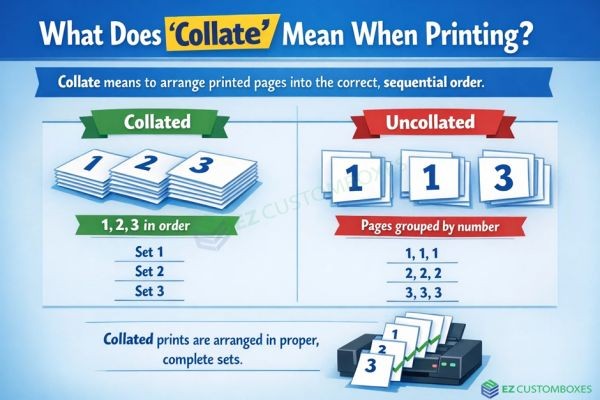
What does collate mean when printing. Collate in printing means arranging printed pages in the correct order when producing multiple copies of a multi-page document.
Example of Collated vs Uncollated Printing
Imagine printing three copies of a 5-page document:
-
Collated printing:
1-2-3-4-5
1-2-3-4-5
1-2-3-4-5 -
Uncollated printing:
1-1-1
2-2-2
3-3-3
4-4-4
5-5-5
Collated copies come out ready to staple and distribute.
Why Is Collate Important for Printing?
1. Saves Time
Without collating, you must manually sort pages into proper order. This can take minutes—or hours—for large print jobs.
Collating automatically:
-
Arranges pages correctly
-
Reduces manual sorting
-
Speeds up workflow
For busy offices, this feature is essential.
2. Reduces Human Error
Manual sorting increases the risk of:
-
Missing pages
-
Duplicate pages
-
Incorrect page order
Collated printing minimizes these mistakes and ensures professional results.
3. Improves Document Organization
Whether you're printing:
-
Reports
-
Training manuals
-
School assignments
-
Business proposals
Collated copies make documents easier to distribute and manage.
4. Essential for Professional Printing
In business settings, presentation matters. Collated documents:
-
Look organized
-
Are easier to bind or staple
-
Improve workflow efficiency
-
Enhance professionalism
For print shops and corporate offices, collating is standard practice.
How Does Collate Work When Printing?
When you select the “Collate” option:
-
The printer prints the full document in order.
-
It repeats the process for each copy.
-
Each set comes out complete and sequential.
Most modern printers and software like Microsoft Word, Google Docs, and PDF readers include this setting automatically.
When Should You Use Collated Printing?
You should enable collate when:
-
Printing multiple copies of multi-page documents
-
Preparing meeting materials
-
Creating booklets or manuals
-
Printing classroom handouts
You may skip collating if:
-
Printing single-page documents
-
Printing only one copy
-
Separating pages intentionally
Collate vs Uncollated Printing: Which Is Better?
Use Collated Printing When:
-
You need complete document sets
-
You want to save time
-
You’re preparing professional materials
Use Uncollated Printing When:
-
You need grouped pages
-
You’re separating sections
-
You plan to assemble documents differently
In most office situations, collated printing is the better choice.
Benefits of Using the Collate Option
Here’s a quick summary of why collate is important for printing:
-
Saves time
-
Reduces errors
-
Improves efficiency
-
Keeps documents organized
-
Enhances professionalism
-
Ideal for bulk printing
Common Mistakes to Avoid
-
Forgetting to select “Collate” before large print jobs
-
Assuming printers automatically collate
-
Printing uncollated copies and manually sorting them
Always double-check your print settings before clicking “Print.”
FAQs About Collating in Printing
What means collate when printing?
The collate meaning printer will organized pages.
Is collated printing slower?
It may take slightly longer per set, but it saves significant time by eliminating manual organization.
Does collate work for double-sided printing?
Yes. Collating works with duplex (double-sided) printing and keeps pages in proper sequence.
Should I always choose collate?
Choose collate when printing multiple copies of multi-page documents. It’s not necessary for single-page prints.
How do I turn on collate?
In your print settings, check the “Collate” box before printing. Most software enables this option automatically when printing multiple copies.
Conclusion: Why Collate Truly Matters
The collate meaning printer are organized, saves time, and reduces costly mistakes. Whether you’re printing business reports, school materials, or manuals, using the collate option ensures each copy comes out complete and ready to use.
Before your next print job, double-check your settings and select “Collate” to improve efficiency and professionalism.
Want smoother printing and fewer errors? Start using the collate feature on every multi-page print job today.






